How to delete your Kwaafri account
Brian Otieno · Oct 17, 2026 · 3 min read
If you no longer wish to use Kwaafri, you can permanently delete your account directly from your profile. This guide walks you through the process, including how to confirm your decision and what happens after deletion.
Before You Begin
You must have a Kwaafri account to delete it. And the fact that you are here, means you probably do have an account. If you created kid profiles under your account, deleting your account will also delete those profiles.
Important: Account deletion is permanent and cannot be undone. Your account, learning progress, and all kid profiles associated with your account will be deleted.
Make sure you are ready to proceed before confirming your decision.
Step 1: Open Your Profile
First, sign in to your Kwaafri account.
Navigate to your profile page at /profile. You can also access the account deletion option from any page under /profile/, such as your profile settings or other profile-related pages.
Step 2: Find the Delete My Account Button
Once you are on a profile page, look at the sidebar on the left.
At the bottom of the sidebar, you will find the Delete my account button, right below the Logout button.. Click it to open the account deletion confirmation dialog.

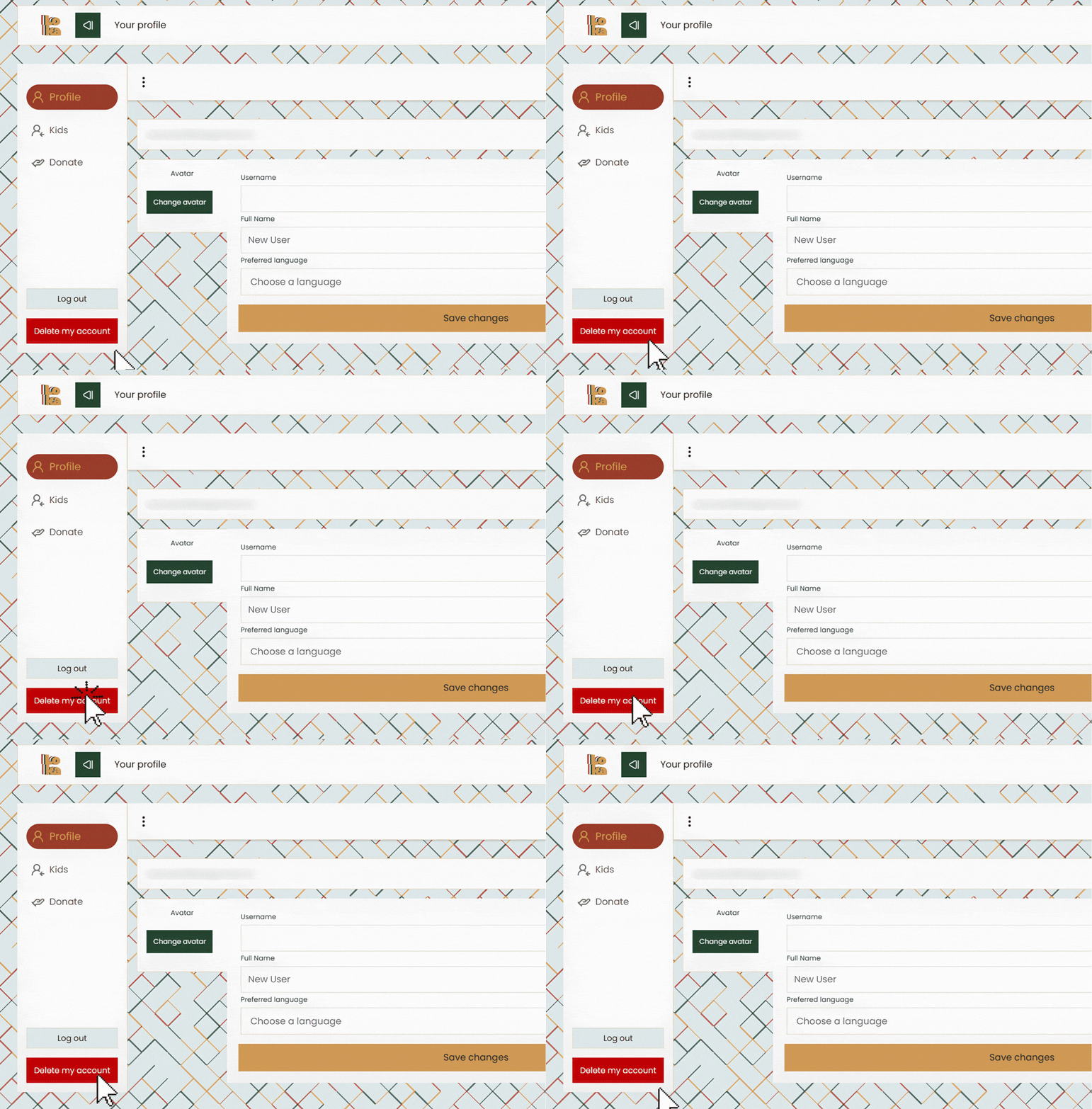
Step 3: Review the Confirmation Dialog
Before your account is deleted, Kwaafri will ask you to confirm your decision.
The dialog will explain what will be permanently deleted, including your learning progress and the number of kid profiles associated with your account.
You will also be asked to verify your identity by entering the email address associated with your Kwaafri account.
Step 4: Enter Your Email Address
To confirm that you understand the consequences of deleting your account, type your email address exactly as requested in the dialog.
For example, if your account email is you@example.com, enter that exact email address in the confirmation field.
The Delete action becomes available once your entry matches the email address associated with your account.
Take a moment to ensure that you have entered the correct address and that you really want to proceed.
Step 5: Delete Your Account
Once your email address matches, click Delete to confirm.
Kwaafri will delete your account and its associated learning progress and kid profiles. After successful deletion, you will be redirected to the Kwaafri home page.
That's it! Your account deletion process is complete.
Frequently Asked Questions
Can I recover my account after deleting it?
No. Account deletion is permanent and cannot be undone. Your account and associated learning progress and kid profiles will be deleted.
Do I need to delete my kid profiles separately?
No. All kid profiles associated with your account are deleted when you delete your account.
What if I enter the wrong email address?
The email address must match the one associated with your Kwaafri account. If it does not match, correct your entry before proceeding.
Where can I find the account deletion option?
You can find the Delete my account button at the bottom of the sidebar on /profile and other pages under /profile/.
What happens after I click Delete?
Once the deletion succeeds, your account is deleted and you are redirected to the Kwaafri home page.
Need Help?
If you have questions about deleting your account or how your personal information is handled, visit our Privacy Policy or contact us through the contact page.
We want you to have control over your account and your data, even when that means choosing to leave Kwaafri .
For a clearer understanding, watch this tutorial video to see how you can delete your own account:
Comments (1)
Log in to join the conversation.
Brian Otieno
I hope this helps